

5.0 on the Shopify App Store

Add product fees and bottle deposits to Shopify.

FeeBee is the Shopify fees app for product fees, bottle deposits, tariffs and surcharges — shown clearly on product pages, cart, checkout, Express Checkout and POS.

Add FeeBee to ShopifySee fee examples

14-day free trial · Free for development stores

Built for real Shopify fee workflows

Merchants use FeeBee when fees need to be visible, consistent and hard to miss.

500+happy merchants
5 starShopify App Store rating
3 mintypical setup time
14 daysfree trial included
Why FeeBee

Required fees should not depend on theme hacks or manual work.

Deposits, tariffs and surcharges often need to follow the product from the product page to the cart, checkout, order, Express Checkout and Shopify POS. FeeBee keeps those fees visible and consistent without custom theme code.

Avoid removable add-ons

Add mandatory product fees so customers see the charge clearly and cannot simply remove it like an optional product.

Keep online and POS aligned

Use the same fee logic for your storefront, checkout and in-person sales through Shopify POS.

Explain the charge before payment

Display fees on the product page, cart and checkout so customers understand deposits, tariffs and surcharges early.

Everything FeeBee does

One Shopify app for product fees, deposits and surcharges.

Create a fixed fee or percentage fee once, choose where it applies, and FeeBee adds it automatically across the shopping journey.

Bottle deposits

Add deposits to bottles, cans, crates and reusable packaging with clear line-item display.

Fixed and percentage fees

Charge a fixed amount such as €0.25 bottle deposit or a percentage-based surcharge for selected products.

Visible customer fees

Show fees on product pages, cart, checkout and orders so shoppers understand the total before paying.

Cart, checkout and POS

Apply fees in the cart, Shopify checkout, Apple Pay, Google Pay, Shopify POS and draft orders.

Market-based rules

Limit fees to selected Shopify Markets so the right deposit, tariff or surcharge appears by country.

Tariffs and duties

Pass on import tariffs, customs duties and handling charges per product or selected market.

Works with every theme

No theme customization required. FeeBee works with all Shopify themes and Shopify plans.

Guided setup

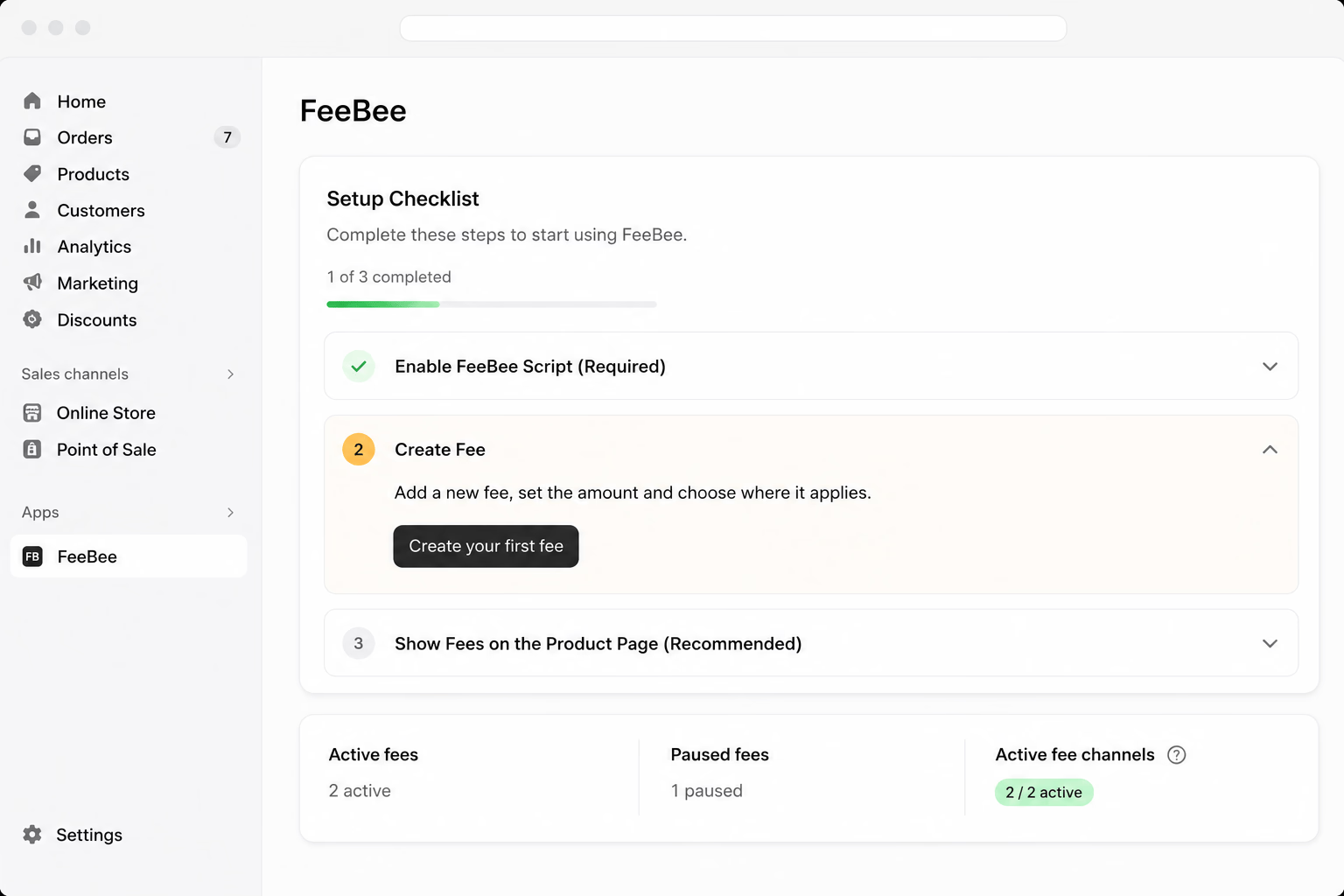
Install the app, activate the checkout extension and create your first fee in a few clicks.

No-code setup

Create your first Shopify product fee in minutes.

FeeBee guides you through setup from the Shopify admin. Activate the app, choose your fee type and connect it to products or collections.

  • No developer or theme edits
  • Fixed amount or percentage
  • Apply to products and collections
FeeBee setup guide in the Shopify admin
Fee rules

Control where each fee applies.

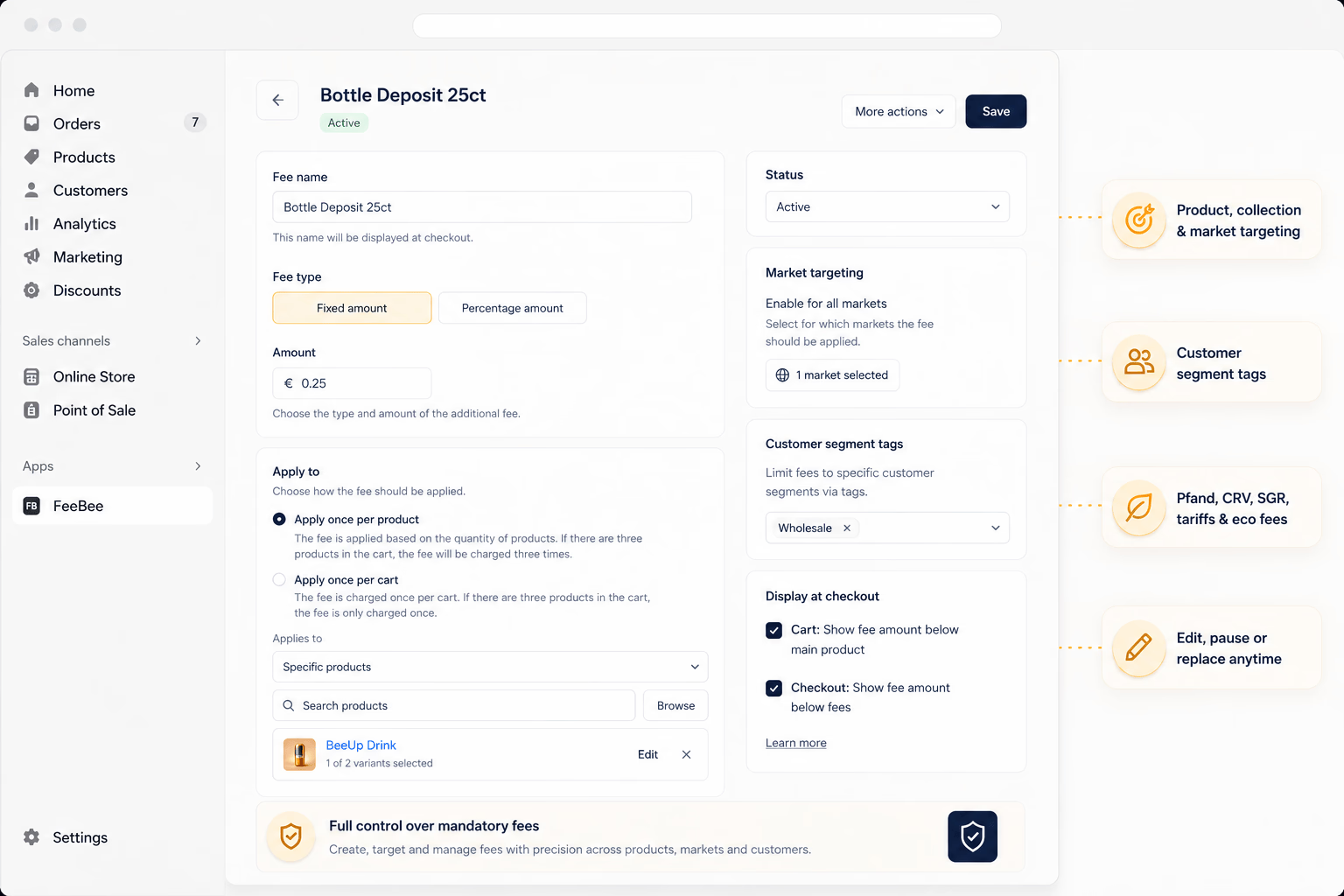
Use FeeBee for bottle deposits, tariffs, packaging fees, service fees and other mandatory charges. Limit fees by market when only certain countries need them.

  • Product, collection and market targeting
  • Limit fees to specific customer segments via tags
  • Useful for Pfand, CRV, SGR, tariffs and eco fees
  • Edit, pause or replace fees anytime
Creating a product fee or bottle deposit in FeeBee
Transparent checkout

Itemized fees before the customer pays.

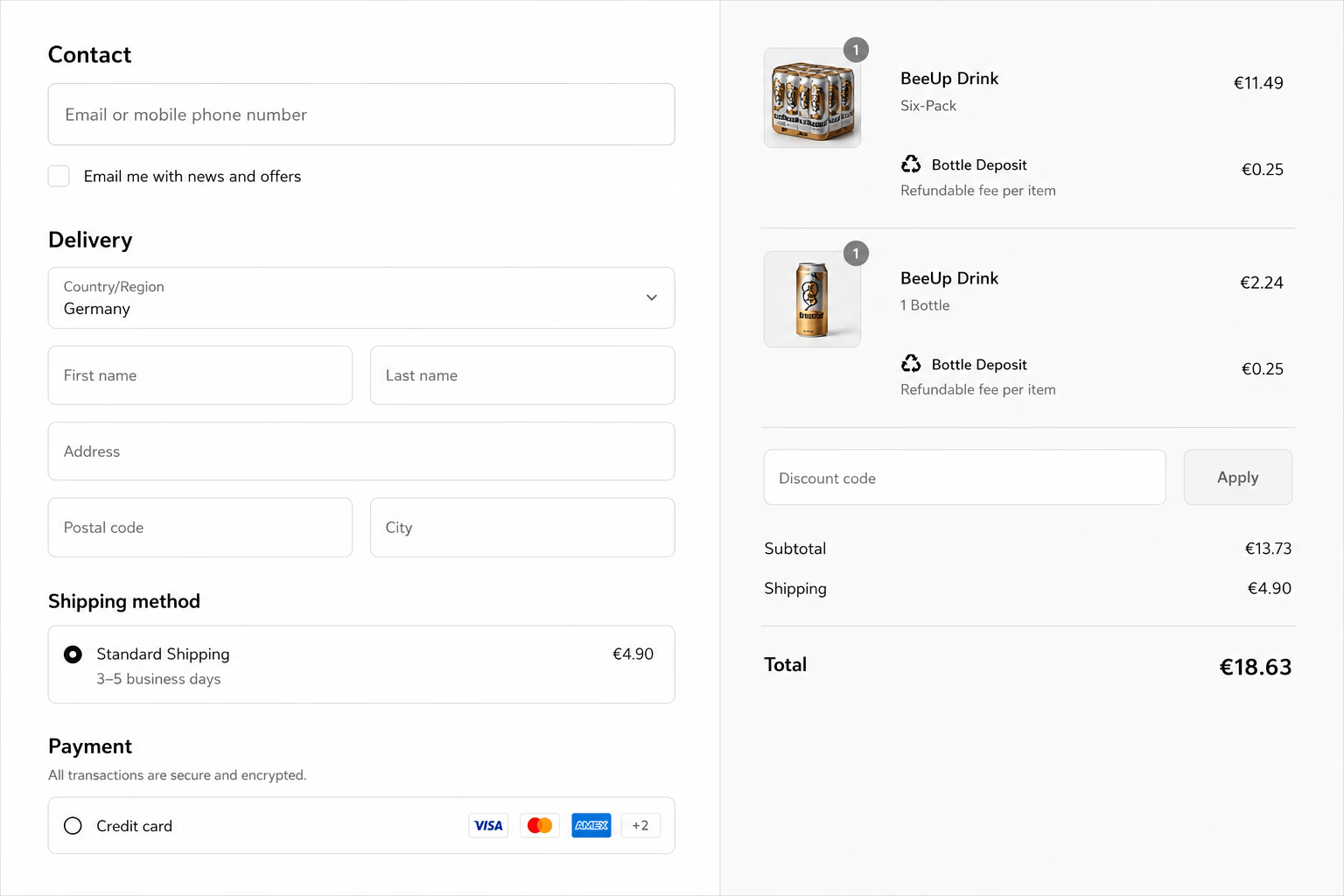
Fees are displayed clearly during the buying journey, including cart, checkout and orders, so customers know why a charge was added.

  • Visible on product pages, cart and checkout
  • Works with Apple Pay and Google Pay
  • Customers cannot remove required fees
A bottle deposit fee itemized in the Shopify checkout
Retail ready

The same fees in Shopify POS.

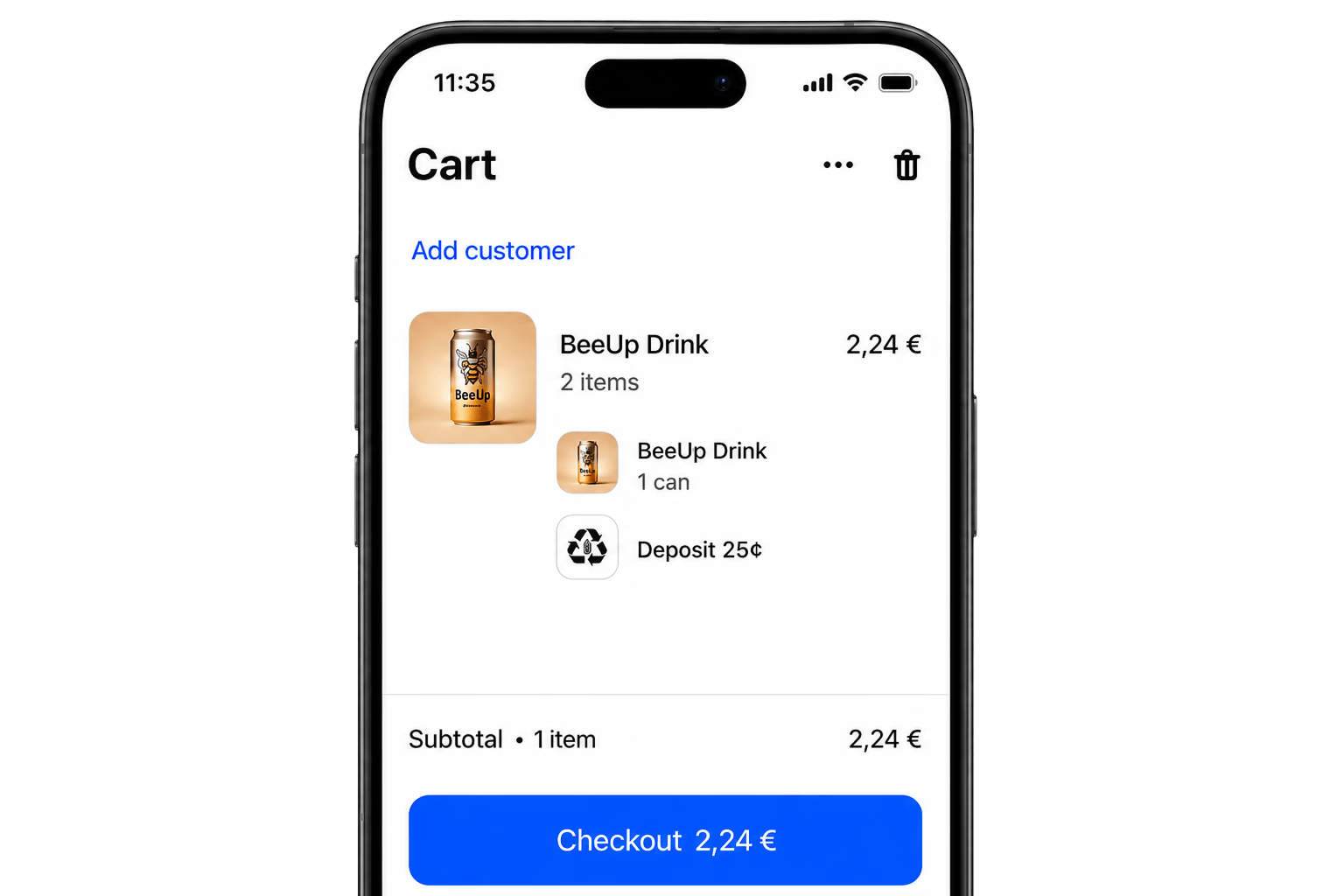
Selling in person? Keep deposits and surcharges consistent between your online store, POS and draft orders.

  • Compatible with Shopify POS
  • Useful for bottle deposits and local fees
  • Consistent customer-facing fee display
A fee added automatically in the Shopify POS cart
Built for real-world fees

Use FeeBee for the charges merchants actually need.

Bottle deposits

Pfand, CRV, BCRS, Statiegeld and Pant for bottles, cans, crates and containers.

Tariffs and duties

Import tariffs, customs surcharges and country-specific cost recovery on selected products.

Handling and service fees

Small-order, service, setup, handling or operational fees as fixed or percentage charges.

Payment surcharges

Card, processing or payment-related fees where your local rules allow them.

Packaging and eco fees

Recycling fees, packaging fees, environmental charges and eco-participation fees.

Reusable deposits

Deposits for reusable packaging, returnable boxes, crates, containers and equipment.

Insurance fees

Additional insurance, protection or warranty-style fees tied to selected products.

Custom mandatory fees

Any product-level or cart-level charge that must appear clearly before checkout.

Deposit-return markets

Seamless, world-wide bottle deposits

Easily charge regulatory fees such as bottle deposits in all countries you ship to.

Germany / DACH

Pfand, Einwegpfand, Mehrwegpfand

Add deposits for bottles, cans and crates and show them clearly during checkout.

Romania

RETURO and SGR

Create visible return-system deposits for products that need a Garanție SGR style charge.

United States

CRV, tariffs and core charges

Use FeeBee for California Redemption Value, import tariff surcharges or product core charges.

Canada

BCRS and recycling deposits

Apply bottle deposit and recycling fee terminology for Canadian merchant workflows.

Netherlands

Statiegeld

Add statiegeld-style deposits for bottles, cans and other eligible products.

Nordics

Pant

Support deposit labels commonly used in Scandinavian bottle-return systems.

Latvia

Depozīta maksa

Use market-specific wording for container deposits and local fee rules.

FeeBee helps configure and display fees in Shopify. Merchants remain responsible for validating legal, tax and reporting requirements in their market.

How it works

Three steps to your first Shopify fee.

1

Install FeeBee

Add the app from the Shopify App Store and activate the guided checkout setup.

2

Create a fee rule

Choose fixed or percentage pricing, name the fee and select products, collections or markets.

3

Go live

FeeBee displays the fee on product pages, cart, checkout, orders, Express Checkout and POS.

Shopify App Store reviews

Merchants use FeeBee for fees customers must see.

5.0 star Shopify App Store rating
“Great app for deposits and other fees. Much more reliable than our previous app, which often failed to include the deposit in the shopping cart. It's also the only app I've found that works with draft orders.”
MITOcareGermany
“This is the first fee app that has worked flawlessly for adding mandatory bottle deposits to my online store, as well as POS.”
Santé Dry Bottle ShopCanada
“For such a simple app, it does what no other app does, applies a fee that is visible to the customer at all points during the purchasing and checkout process, and doesn't let the customer remove it. Great app, and very helpful support!”
Mike's BikesUnited States
Pricing

Simple pricing for every Shopify fee workflow.

Start with a free trial, use FeeBee free on development stores, then keep all product fees and deposits on one clear monthly plan.

Premium plan
$9.99/ month
  • 14-day free trial
  • Free installation for development stores
  • Fixed price and percentage fees
  • Apply fees to products and collections
  • Supports POS and Express Checkout
Start free trial
FAQ

Questions, answered.

What kind of Shopify fees can I add with FeeBee?

FeeBee supports fixed and percentage fees for product fees, bottle deposits, Pfand, tariffs, handling fees, packaging fees, recycling fees, payment surcharges, insurance fees and other custom charges.

Can I add bottle deposits or Pfand to Shopify?

Yes. You can add fixed bottle deposits to products such as bottles, cans, crates or reusable packaging and display them clearly before checkout.

Can customers remove the fee?

FeeBee is designed for required fees. Fees are applied through the buying journey instead of being added as optional products that customers can remove from the cart.

Where are fees displayed?

Fees can be shown on product pages, in the cart, at checkout and in the order, so customers understand the charge before payment.

Does FeeBee work with Express Checkout?

Yes. FeeBee works with express checkout flows such as Apple Pay and Google Pay.

Does FeeBee work with Shopify POS?

Yes. FeeBee supports Shopify POS, so the same deposits and surcharges can be used for in-person sales.

Does FeeBee work with Shopify draft orders?

Yes. FeeBee also supports Shopify draft orders.

Can I apply fees only in certain countries or markets?

Yes. FeeBee can limit fees to selected Shopify Markets, which is useful for country-specific deposits, tariffs and recycling fees.

Can I charge percentage-based surcharges?

Yes. FeeBee supports both fixed-price fees and percentage-based fees.

Does FeeBee work with my theme?

Yes. FeeBee works with Shopify themes without custom theme code or storefront customization.

How much does FeeBee cost?

FeeBee has a free development plan and a 14-day free trial. The premium plan is $9.99/month after the trial.

Shopify product fees without the hassle.

Use FeeBee for bottle deposits, tariffs and surcharges across all your sales channels.

Add FeeBee to Shopify